


Filter
Brand

Brand
Category
Category
For Use With
For Use With
Manufacturer
Manufacturer
Product Type
Product Type
Standards/Approvals
Standards/Approvals
Kit Name
Kit Name
Select quantity

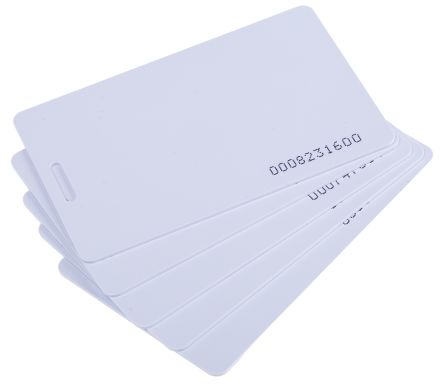
RS PRO Key FobProximity Card for Access Control Kits
RS Stock No. 741-8297
Brand RS Pro
- Accessory Type: Proximity Card
- Category: Access Control Accessories
- For Use With: Access Control Kits
AED 65.50
in stock now
View more
Select quantity
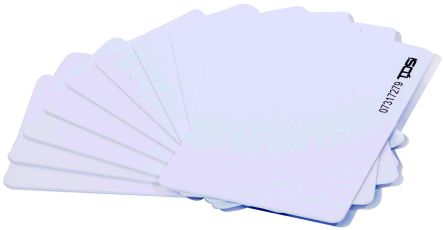
TDSi Card SetProximity Card for Readers
RS Stock No. 133-1921
Brand TDSi
- Accessory Type: Proximity Card
- Category: Access Control Accessories
- For Use With: TDSi Readers
AED 201.11
in stock now
View more
Select quantity
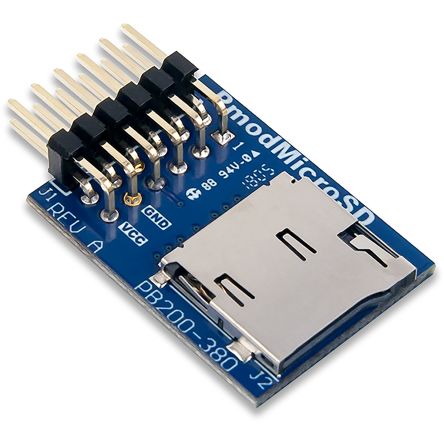
Digilent 410-380 Pmod MicroSD Add On Board for Store and Access On System Board
RS Stock No. 184-0482
Brand Digilent
- Category: Memory Development Tools
- Kit Classification: Add On Board
- Kit Name: Pmod MicroSD
AED 43.42
in stock now
View more
Select quantity

Digilent 410-123 Pmod SD Add On Board for Store and Access On System Board
RS Stock No. 184-0475
Brand Digilent
- Category: Memory Development Tools
- Kit Classification: Add On Board
- Kit Name: Pmod SD
AED 66.57
in stock now
View more
What is an access card?
An access card is a credential used in modern access control systems to grant or restrict entry to doors, gates, rooms, and other secure areas. Most access cards are a small plastic PVC badge (often CR80 size) that carries encoded data or a magnetic stripe, and increasingly a contactless RFID or smart-card chip. When presented to a compatible reader, the card’s data is authenticated by a networked controller or door controller to determine whether the user should be granted access. Common terms you’ll see include access card, access badge, employee ID badge, door access card, proximity card, and smart card. Technologies range from low-frequency proximity (125 kHz) to high-frequency contactless (13.56 MHz) and smart cards (ISO/IEC 14443 or 7816 standards), with dual-interface cards able to support multiple technologies in one credential.
How does an access card work within an access control system?
In a typical setup, you have three main components: the credential (the access card), the reader, and the access control system (including door controllers and a database of permissions). When you present the card to a reader:
- The reader captures the card’s data via magnetic stripe, RFID/NFC, or smart-card contact.
- The reader forwards the data to the access controller using a standard interface such as Wiegand, RS-485, or OSDP (for higher security).
- The controller checks the credential against the centralized or local permissions list, including time-based or location-based rules.
- If authorized, the controller triggers the door lock, records a transaction for audit trails, and optionally communicates with a security dashboard.
What types of access cards are available, and how should I choose between them?
Access cards come in several flavors, each suited to different security needs and environments:
- Proximity cards (125 kHz) — Simple, inexpensive, and durable; commonly used with low-frequency readers for quick entry.
- High-frequency smart cards (13.56 MHz) — Include contactless smart cards and NFC; support advanced security and multi-application use (MIFARE DESFire, DESFire EV1, ISO 14443 type A/B).
- Magnetic stripe cards — Cost-effective and easy to print; lower security and easier to clone, often used for legacy systems.
- Dual-interface cards — Combine magnetic stripe and RFID in one card for compatibility and a smoother migration path.
- Clamshell or laminate cards — Durable housing to resist bending and wear; preferred for daily-use employees.
- Smart cards (contact or contactless) — High security, cryptographic keys, and ability to store more data for complex workflows.
How should I choose the right access card for my facility?
Selecting the right credential depends on security requirements, scalability, and maintenance considerations:
- Security level — Smart cards with cryptographic keys offer stronger protection and more features (permissions, time windows, multi-factor rules) than simple proximity or magnetic stripe cards.
- Reader and controller compatibility — Ensure the credential format matches your readers (Wiegand 26/34, or modern OSDP) and that your door controllers support the card technology.
- Durability and environment — For high-traffic or harsh environments, choose durable PVC cards or composite materials with lamination or protective overlays.
- Printing and personalization — If you need branded employee badges, consider color photo printing, holograms, and encoding options (mag stripe, RFID, or both) with a PVC card printer.
- Cost and supply chain — Magnetic stripe cards are cheapest but less secure; dual-interface and smart cards incur higher costs but improve security and flexibility.
- Management and revocation — Plan for centralized credential management, easy revocation, and temporary or time-bound access rules to simplify administration.
Can access cards be customized or printed in-house?
Yes. Many organizations print and encode access cards in-house using PVC card printers and encoding devices. Customization options include:
- Full-color photo or logo on the card face
- Employee name, department, and role
- Credential IDs, barcodes, or QR codes for offline verification
- Magnetic stripe encoding or high-security RFID/NFC contactless data
- Security features like holographic overlays, UV coating, or laminate layers for anti-tamper protection
How do you manage, update, and revoke access cards?
Credential lifecycle management is essential for security and compliance. Key practices include:
- Centralized identity and access management (IAM) with a secure database of user permissions
- Time-based and location-based access rules to limit when and where a credential works
- Immediate revocation on loss or termination, with temporary credentials for guests or contractors
- Regular audits of access logs and anomaly detection to spot unusual entry patterns
- Secure distribution and personalization workflows to prevent cloning and data leakage
What are common questions about installation, maintenance, and troubleshooting?
Here are practical answers to frequent concerns:
- Installation — Verify reader placement, door hardware compatibility, and proper cabling (Wiegand/OSDP, power, door strike). Plan for a scalable architecture to accommodate future readers and zones.
- Maintenance — Regularly clean readers and check mounting hardware. Replace worn cards and laminate overlays as needed. Ensure firmware is up to date and that backup copies exist for credential data.
- Troubleshooting — If a card is not recognized, confirm encoding matches the reader, check database permissions, and verify that the door controller and network links are functioning. For intermittent failures, inspect antenna placement, interference sources, and reader power supply.
- Security considerations — Use strong cryptography for smart cards, enable mutual authentication between readers and controllers, and disable legacy, insecure card formats where possible.
- Replacement and migration — When upgrading technologies, plan for a phased migration with dual-interface cards to minimize disruption and ensure backward compatibility.